
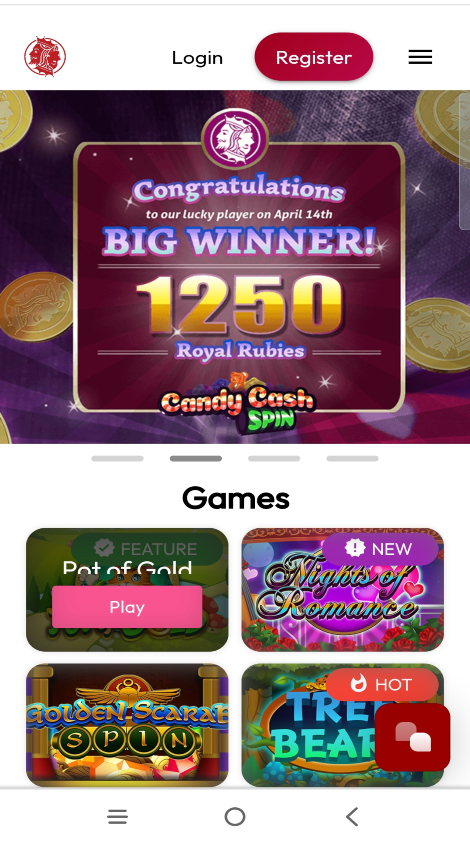
A controlla qui account gives you beyond a user name and passcode: it is the entry point to payments, withdrawals, play history, rewards, and personal documents. That turns the log-in page among the most important security checkpoints in the entire account lifecycle. This guide leads Swiss members through registration, identity verification, picking secure login details, enabling additional security when it can be used, regaining entry, and solving frequent sign-in issues. The steps center on reducing the chance of account theft and approval delays. These recommendations comply with common internet casino account procedures, but you still should check Royal Game Casino website for any present requirements.
Account Registration Steps for Switzerland Users
Swiss residents who wish to use Royal Game Casino need to register at the outset and submit precise personal data. You begin with the registration button on the casino website. Input an email address, choose a password, and acknowledge that you accept the terms and conditions. Royal Game Casino may then require your name, date of birth, residential address in Switzerland, and mobile number. The interface may be shown in German, French, Italian, or English depending on your region, but the registration requirements stay the same. Utilize exactly the details shown on your Swiss identification documents. Mismatches can hinder verification later.
Form Fields and Document Readiness
Common registration form fields contain your full legal name, date of birth, street address, postcode, city, and contact details. Some accounts also ask for a preferred currency or communication language. Do not employ nicknames, shortened names, or an old address. A common mistake is inputting a first name that differs from the one on your passport or identity card. Check that the postcode matches the city before you submit the form; Swiss verification systems often validate address data. It is beneficial to keep a valid Swiss ID or passport nearby, even if the first step does not require an upload. When the form includes a phone number, employ a mobile number with the Swiss +41 country code.
Enabling the Account
After you submit the form, Royal Game Casino may ask you to verify the account through an email or SMS link. Examine the inbox you used during registration, including the spam or junk folder. Activation links often expire quickly, so select the link as soon as it appears. If no email appears, the registration might not have gone through, or the address contains a typo. Once activated, you can sign in and review your account settings. Many accounts maintain limited functions until identity verification is complete. Save a record of the exact email address and phone number you registered with. Those details are your main recovery channels.
2FA and Account Protection
Two-step verification, or 2FA, introduces a second check beyond the password. If Royal Game Casino includes 2FA in the account security settings, enable it. It cuts the risk of account takeover after a password leak. The most typical method is a time-based one-time passcode from an authenticator app on your phone. SMS codes work too, but app-based codes depend less on mobile network delivery. Once 2FA is on, you require the password plus a short-lived code to log in. Even if someone acquires your password, they would still require that second factor.
Activating App-Based Two-Factor Authentication
The setup initiates in the account security or login settings. Pick the authenticator option and read a QR code with a mobile app. The app then shows a six-digit code that updates every 30 seconds. To finalize setup, enter the current code on the Royal Game Casino page. After activation, the platform might provide you backup codes. Store those codes offline in a secure place, not on the same phone as the authenticator app. Write down the backup codes before you exit the security settings; they are frequently displayed only once. If you lose the phone, backup codes can recover access.
Recovery Codes and Restoration Choices
Backup codes are single-use recovery values. Treat them like passwords. A wise habit is to write down them and hold them with important documents at home. Do not store them in an email draft or an unencrypted cloud note. If you forget both the authenticator app and the backup codes, account recovery requires customer support and might involve identity verification. Also review any logged-in session features if they are available. Logging out unused sessions on old phones or shared laptops minimizes the chance of unauthorized access even with 2FA active. Examine the account security page after travel or a device change.
Login Recovery and Login Assistance
If you cannot log in because you forgot the password, go to the login page. The “forgot password” or “reset password” link is typically located below the password field. Provide the email address tied to the account and complete the form. Royal Game Casino delivers a reset message when the address matches an active account. Allow a short time and review the spam folder before retrying. Reset links typically lapse quickly, so click the link without delay. If multiple reset emails appear, use only the most recent one.
Link Protection
A password reset link is a sensitive credential while it is still usable. Avoid sending that link to somebody claiming to be casino support. Customer support never requests for the complete recovery link or your new password. Load the reset page in the identical browser window and create the new password only on the legitimate Royal Game Casino website. Check the address bar for the right web address and a secure HTTPS link as a standard security practice. Refrain from resetting your password on open wireless networks without a secure virtual private network, because open networks can leave your connection to interception.
If the Registered Email Becomes Unavailable
If you lose access to the registered email address, password recovery turns more complex. You can continue to regain the account by getting in touch with Royal Game Casino support and proving who you are. Be ready with the original registration details, a copy of a Swiss ID or passport, and any current payment details you have. Support may ask extra security questions before modifying the email address. Because of this, keeping the registration email active and secure is among the top account protection measures. If you move to a different ISP or abandon an old email address, update the contact details on your account as promptly.
ID Verification and KYC Requirements in Switzerland
Identity verification, often referred to as KYC or know-your-customer, is a necessary part of operating a trustworthy online casino. For Swiss users, this step confirms that the account holder is sufficiently aged, is the same person who created the account, and is not utilizing someone else’s documents. Royal Game Casino may ask for verification before your first withdrawal, after a cumulative deposit threshold, or at sign-up according to its procedures. You should be prepared to provide a government-issued identity document and a recent proof of address. The review is standard when the documents are legible and current, but it can slow down when details do not match the registration form.
Commonly Requested Documents
A Swiss passport or Swiss identity card is usually enough for the identity part of KYC. Foreign residents in Switzerland can often utilize a valid residence permit as long as it has a photograph. The proof-of-address document needs to display the same name and address you used during registration. Utility bills, bank statements, or official letters from a Swiss municipality or cantonal authority are valid if they are no older than three to six months. Mobile phone bills sometimes may be refused, according to the operator. Capture documents so all four corners are visible, with no glare, cropping, or editing. Check the upload screen for file format and size limits.
Verification Timing and Status
Royal Game Casino does not always validate verification instantly. Peak hours and manual reviews can slow things down. Do not submit multiple copies of the same document while a review is pending; that can cause duplicate cases. Check your account status or notification area instead for any inquiry for extra information. If the status stays pending longer than the platform’s normal range, customer support can advise you. Before you contact support, check that your document is still valid, the address matches, and the file is readable. After verification succeeds, the account generally unlocks full withdrawal and deposit features.
Establishing a Robust Login Password and Handling Credentials
Your login password is the first line of protection for a Royal Game Casino account. Craft one that cannot guessed from public information. A strong password usually runs at least 12 characters and blends uppercase letters, lowercase letters, numbers, and symbols. But length counts more than a predictable mix. A long passphrase made of four or five random words could be easier to remember and harder to crack. Do not incorporate your name, date of birth, street, or the word “casino.” Reusing a password from email, banking, or social media is risky, because a breach on one service can expose your casino account.
Building a Passphrase
Example Construction Method
A practical method is to merge unrelated words into a passphrase, then add numbers and symbols only where they do not produce obvious substitutions. For example, you might take the words “river lamp chair branch” and change them to “River7Lamp!ChairBranch” when the password policy demands complexity. The key is to choose words that are random to you, not a sentence from a song or book. A password manager can produce and store these credentials safely. If you use a password manager, protect it with a strong master password and a second factor where available. Writing passwords on paper is not ideal, but a locked physical location outperforms keeping them in an unencrypted note on your phone.
Credentials Storage and Updates
Change your password when you notice unauthorized access, when your linked email address gets compromised, or when you used the account on a shared device. Changing it right after a security incident could stop further access, but only if the new password is not a small twist on the old one. Avoid saving passwords in public or shared browsers. Automatic form-filling can hand your credentials to the next person who uses the device. If the browser offers to remember the password, say no on shared computers. Royal Game Casino may also send security notices to your registered email address. That inbox demands a strong password and, ideally, its own two-factor authentication.
Resolving Common Login and Verification Issues
Most login errors come from wrong credentials, browser problems, or unfinished verification. They are rarely a significant security problem. If you are locked out, initially check if caps lock is on, if the email address is spelled exactly as registered, and if autofill inserted an old password. Clearing the browser cache or testing a different browser can rule out corrupted cookies. If the account is temporarily locked after multiple failed attempts, waiting out the stated lockout period may be adequate. Submit persistent failures through the official support channel, not through social media or unverified contact forms.
Browser and Device Solutions
Clearing Cache and Testing a Clean Profile
A useful troubleshooting sequence is to clear cookies and cached files for the Royal Game Casino site, then close and reopen the browser. If the problem continues, open a private or incognito window and try logging in there. A private window skips most stored form data and can indicate whether the issue stems from a saved password or an extension. Ad blockers, privacy tools, and script blockers occasionally interfere with login forms. Temporarily disabling them can assist. If you connect through a corporate network or a VPN server outside Switzerland, you may also encounter location-related blocks. Switching to a normal connection can fix that type of error.
Document Rejection and Resubmitting
When verification gets rejected or paused, the most common causes are document quality, expired identity documents, or an address mismatch. Read the rejection message carefully; it usually names the missing item. Take a new photo in good light with the document placed on a dark background. The whole document must be shown and the text must not be blurry. Screenshots or edited files often get rejected automatically. If your proof-of-address document is too old, get a new statement or utility bill before resubmitting. Sending the same unusable file again will not accelerate anything and may add another review cycle.
Frequently Asked Questions
What is required to open a Royal Game Casino account account in Switzerland?
You must be at least 18 years old and provide accurate personal details, such as your full legal name, date of birth, residential address in Switzerland, email address, and phone number. Have a valid Swiss ID, passport, or residence permit ready. The casino may demand email or SMS activation before you can log in.
What is the duration of identity verification take?
The verification duration depends on document quality and the current review volume. Clear, complete documents often are processed quicker than blurry or mismatched files. Some cases are completed within hours, while others take longer. Review your account status instead of submitting duplicate documents. Swiss users can get in touch with support if the status stays pending beyond the normal period shown on the platform.
What should I do if I forget my password?
Utilize the password reset link on the login page, enter your registered email address, and check both the inbox and spam folder for the reset message. The link usually has a short validity, so reset promptly. Choose a new password that is unique and at least 12 characters long. If the email does not come through, get in touch with customer support for help.
Can I use two-factor authentication on my account?
If two-factor authentication is available in the account security settings, turn it on. App-based codes from an authenticator app are generally more reliable than SMS codes. Keep any backup codes in a secure offline location. If you do not see the option in the settings, reach out to support whether it is offered for your account type.
What causes my account to be locked after multiple login attempts?
A short lockout after repeated failed logins is a standard security measure against brute-force attacks. It usually clears automatically after a waiting period. Before you attempt again, check for caps lock, old autofill passwords, and the exact email address. If the lockout does not lift or you believe someone else caused it, use the reset option or contact support.
Am I able to change my registered email address or phone number?
You can change contact details in your account settings when the feature is available. Some changes demand identity verification or support approval to stop unauthorized edits. If you have lost access to the old email address, contact support with proof of identity and ownership of the account. Maintain contact details current after changing providers or moving within Switzerland.